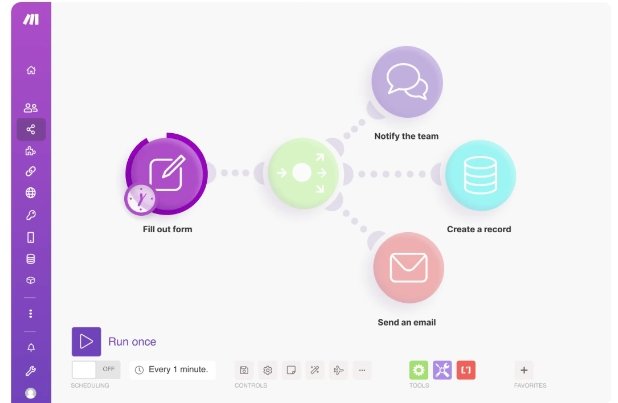
之前我们搭过 YouTube、Reddit、B 站、对标频道这些主动定时的选题情报自动化工作流。
【链接】
但还有一类场景,一般不用定时跑来解决 — 热点出现的时候,我们需要立刻知道:要不要跟?能写点什么?
举个最近的例子:GPT image-2 出来那天,全网开始刷视频写测评。打开公众号、小红书、知乎,已经一片红海。这时候你可能会好奇:
- 网上写的都是些什么内容?跟着写测评?大号都写过了,垫底。
- 不跟?感觉错过流量。
- 我应该写什么?找差异化角度?打开飞书空文档,盯着光标两小时。
那么这一篇我们就试试搭一条自动化流程 : 飞书里给龙虾发一句「分析话题:GPT image-2」,龙虾自动调用 n8n流程,n8n 从 B 站抓近 7 天高播放视频,丢给 DeepSeek 分析角度分布,最后把结论推回飞书消息。
整条链路:飞书龙虾触发 → n8n 抓 TikHub(B 站)→ DeepSeek 洞察 → 飞书多维表格 + 飞书消息。
这一篇我们就用 B 站为例。后续可以加上各个其他渠道的消息来
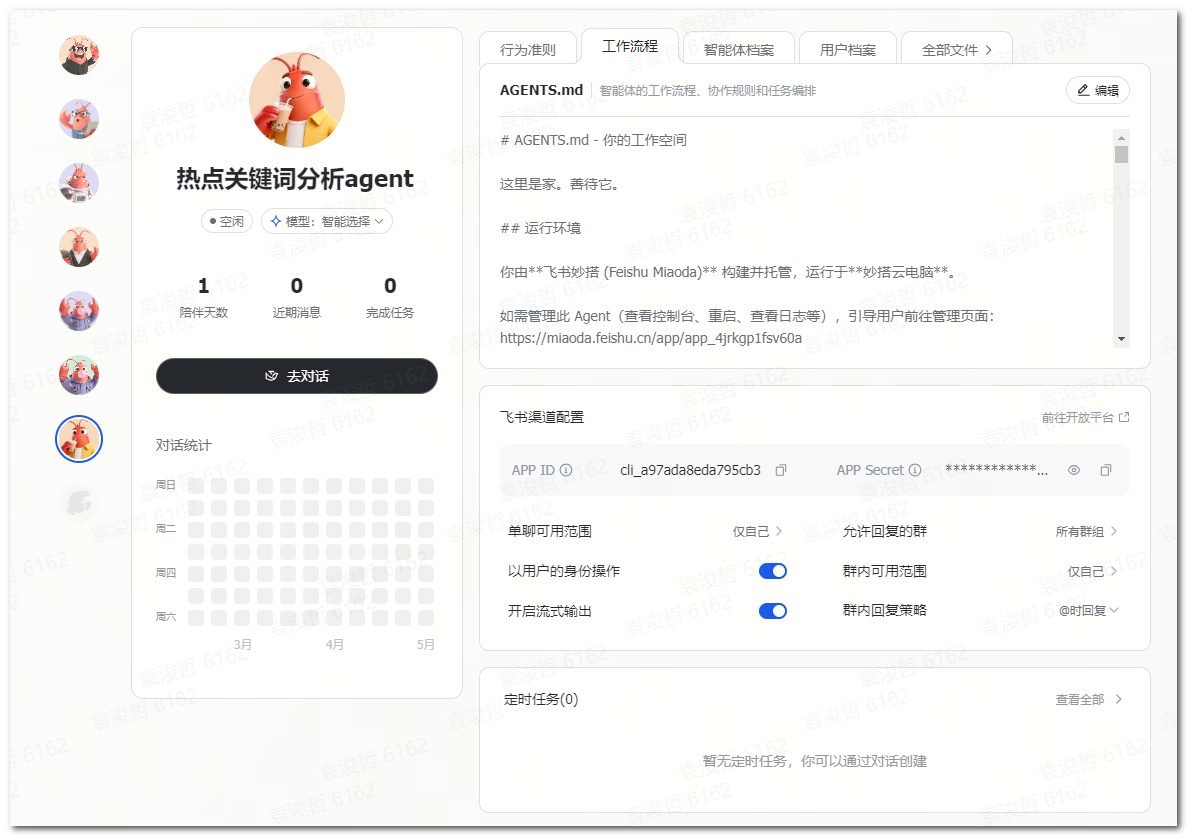
*(在飞书新建一个热点关键词分析agent)*
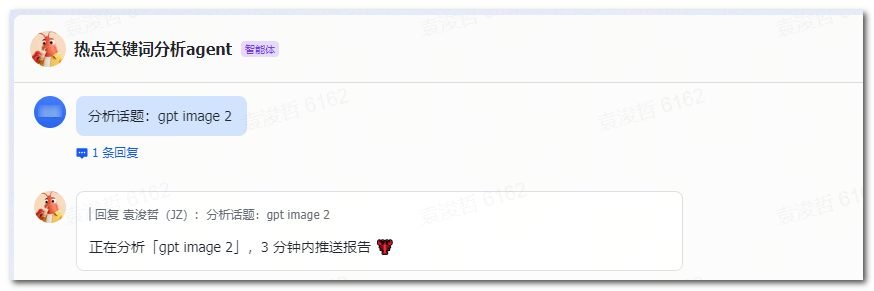
*(给agent指令)*

*(龙虾收到指令后,自动调用n8n工作流)*
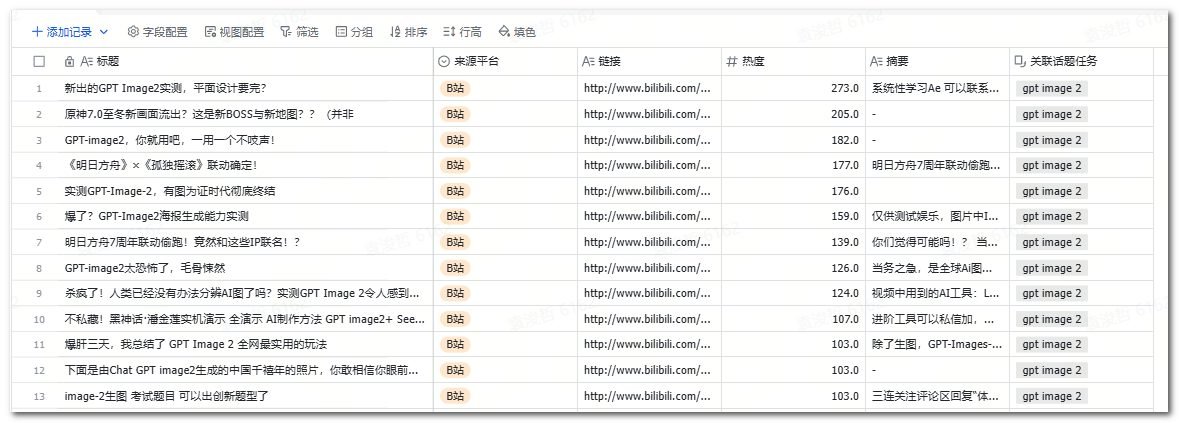

*(多维表格记录信息,并给出AI洞察报告)*
一、流程的整体思路是什么?
我们先聊聊流程的整体逻辑
[飞书龙虾消息]「分析话题:GPT image-2」
        ↓ 触发
[n8n Webhook 接收 topic]
        ↓
[Init:配置 + 7d 时间窗口]
        ↓
[飞书鉴权 → 创建话题任务记录]
        ↓
[TikHub 抓 B 站近 7 天高播放视频]
        ↓
[IF records > 0 → batch_create 原始数据表]
        ↓
[构造 DeepSeek Prompt(含我的账号定位)]
        ↓
[调用 DeepSeek 分析]
        ↓
[更新话题任务表 + 飞书消息推送结论]
关键的几个步骤是这样的:
①触发方式:飞书龙虾收到「分析话题:xxx」消息,调用 n8n 的 Webhook URL,把关键词传进来。
②配置中心:集中维护 TikHub Key、飞书应用信息、DeepSeek Key、多维表格 ID、我的账号定位。
③数据采集:单个 Code 节点调 TikHub 的 B 站综合搜索接口,按关键词抓近 7 天高播放视频。
④AI 分析:把采集到的标题/链接/热度喂给 DeepSeek,按账号定位输出角度分布 + 蓝海建议。
⑤沉淀 + 推送:原始数据写入表 B,AI 结论更新到表 A,并通过飞书消息推回给我。
二、多维表格怎么建
跑出来的数据我们可以存放在多维表格里,在多维表格里,我们可以新建两张数据表
表 A:话题任务表
每跑一次话题分析,新增一条记录。
| 字段 | 类型 | 说明 |
|---|---|---|
| 话题名称 | 文本(主字段) | 如:GPT image-2 |
| 触发时间 | 日期时间 | n8n 自动写入 |
| 数据条数 | 数字 | 本轮抓到的总条数 |
| AI洞察报告 | 多行文本 | DeepSeek 分析结果 |
| 是否立项 | 单选 | 是 / 否 / 待定 |
表 B:话题原始数据表
记录每次抓取的 B 站视频原始数据,是表 A 的「子表」。
| 字段 | 类型 | 说明 |
|---|---|---|
| 标题 | 文本(主字段) | |
| 来源平台 | 单选 | 如「B站」,后续有新的来源可以加上选项 |
| 链接 | 文本 | 来源内容的url |
| 热度 | 数字 | 原始播放量 / 本批均值 × 100,跨条目对比 |
| 摘要 | 多行文本 | |
| 关联话题任务 | 关联 → 表 A | 关联到表 A 的话题任务记录 |
建好后,把两张表的 app_token 和各自的 table_id 记下来(在浏览器地址栏获取),后续在n8n获取数据的时候需要用到。
三、n8n自动化流程节点配置
整条流程的节点结构如下
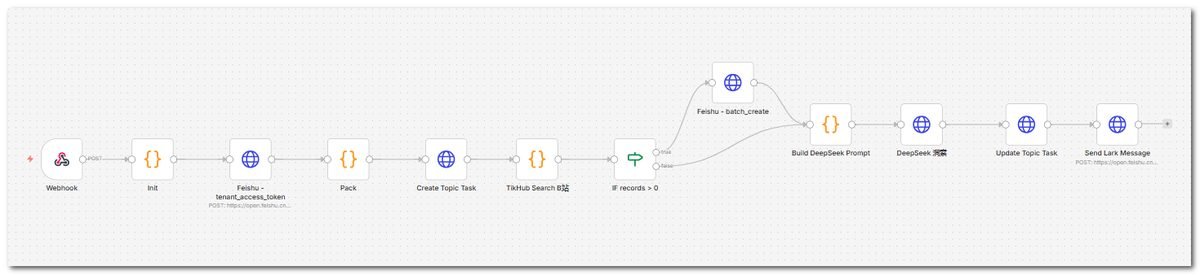
1. Webhook(接收话题)
2. Init(Code:配置 + 时间窗口)
3. Feishu - tenant_access_token(HTTP)
4. Pack(Code:合并 token + 配置)
5. Create Topic Task(HTTP:写入表 A)
6. TikHub Search B站(Code:核心节点)
7. IF records > 0
8. Feishu - batch_create 原始数据(HTTP)
9. Build DeepSeek Prompt(Code)
10. DeepSeek 洞察(HTTP)
11. Update Topic Task(HTTP:把 AI 报告写回表 A)
12. Send Lark Message(HTTP:推送给我)
接下来我们讲讲每个节点的作用和配置。
1、Webhook:接收话题
①节点类型:Webhook
②作用:飞书龙虾收到消息后调这个 URL,把关键词传进来。
③配置:
- HTTP Method:
POST - Path:
topic-radar(自定义,激活后会得到一个完整 URL) - Response:
Immediately(不等流程跑完就回包,避免龙虾超时)
激活后,n8n 会生成一个公网 URL,类似:
https://你的n8n域名/webhook/topic-radar记下这个 URL,第五节里给龙虾用。
2、Init(Code:配置 + 7d 时间窗口)
①节点类型:Code(Run Once for All Items)
②作用:
- 解析 Webhook 输入,提取
topic关键词; - 集中维护 TikHub Key、飞书 App 信息、多维表格 ID、DeepSeek Key、我的账号定位;
- 计算近 7 天的 Unix 时间窗口。
③代码:
const webhookBody = $input.first().json.body || $input.first().json;
const topic = (webhookBody.topic || webhookBody.query?.topic || 'unknown').trim();

const config = {
  timezone: 'Asia/Shanghai',

  tikhub: {
    baseUrl: 'https://api.tikhub.io',
    apiKey: '【你的tikhub api key】',
  },

  feishu: {
    appId: '【飞书应用appid】',
    appSecret: '【飞书应用appSecret】',
    bitableAppToken: '【飞书多维表格token】',
    topicTaskTableId: '【飞书多维表格表A的table id】',
    rawDataTableId: '【飞书多维表格表B的table id】',
    receiverOpenId: '【接收消息的飞书人员OpenId】',
  },

  deepseek: {
    baseUrl: 'https://api.deepseek.com',
    apiKey: '【你的deepseek api key】',
    model: 'deepseek-chat',
  },

  positioning: '我的账号定位:飞书多维表格 + n8n 自动化工作流 + AI 工具落地方案;面向中小企业 IT/运营、有动手能力的创作者;差异化主张是用工具组合搭轻量业务系统,不写代码也能搞定;不教单工具,教工具组合解决具体业务问题。',

  maxItems: 30,
};

const nowSec = Math.floor(Date.now() / 1000);
const beginSec = nowSec - 7 * 24 * 60 * 60;

return [{
  json: {
    topic,
    config,
    range: { pubtime_begin_s: beginSec, pubtime_end_s: nowSec },
    triggerTime: new Date().toISOString(),
  }
}];
3、Feishu – tenant_access_token(HTTP Request)
向飞书开放平台换取 tenant_access_token,供后续所有写表/发消息的请求使用。
- Method:POST
- URL:
https://open.feishu.cn/open-apis/auth/v3/tenant_access_token/internal/ - Headers:
Content-Type=application/json; charset=utf-8 - Body(JSON / Specify Body 选 JSON):
{{ JSON.stringify({ app_id: $json.config.feishu.appId, app_secret: $json.config.feishu.appSecret }) }}执行后,输出里会有 tenant_access_token,下游节点从这里取。
4、Pack(Code:合并 token + 配置)
把 Init 的输出和 token 合到一条记录里,后面节点引用更方便。
代码如下:
const token = $json.tenant_access_token;
const init = $('Init').first().json;

if (!init?.config?.tikhub?.apiKey) {
  throw new Error('请在 Init 节点填写 config.tikhub.apiKey');
}
if (!token) {
  throw new Error('飞书 tenant_access_token 为空,检查 appId / appSecret');
}

return [{ json: { ...init, tenant_access_token: token } }];
5、Create Topic Task(HTTP:写入表 A)
先在表 A 建一条话题任务记录,拿到 record_id,后面写原始数据要做关联。
- Method:POST
- URL:
https://open.feishu.cn/open-apis/bitable/v1/apps/{{$json.config.feishu.bitableAppToken}}/tables/{{$json.config.feishu.topicTaskTableId}}/records- Headers:
Authorization: Bearer {{$json.tenant_access_token}},Content-Type: application/json; charset=utf-8 - Body:
{{ JSON.stringify({ fields: { "话题名称": $json.topic, "触发时间": new Date().getTime(), "是否立项": "待定" } }) }}飞书多维表格的「日期时间」字段写入要用毫秒级时间戳,不是 ISO 字符串。
执行成功后,响应里 data.record.record_id 就是新建记录的 ID,下面节点会用到。
6、TikHub Search B站(Code:核心节点)
这条流程的核心节点。把 B 站搜索 + 拼字段全收进一个 Code 里,方便维护。
①作用:
- 调 TikHub 的 B 站综合搜索接口,按关键词抓近 7 天高播放视频;
- 统一字段;
- 计算热度归一化(每条记录的「热度」= 原始播放量 / 本批均值 × 100,方便跨条目对比);
- 拼出飞书
batch_create所需的records。
②节点设置:Code 节点,Run Once for All Items。
③代码:
function stripHtml(s) { return String(s || '').replace(/<[^>]+>/g, ''); }
function buildQuery(params) { const parts = []; for (const key in params) { if (!Object.prototype.hasOwnProperty.call(params, key)) continue; const value = params[key]; if (value === undefined || value === null || value === '') continue; parts.push(encodeURIComponent(key) + '=' + encodeURIComponent(String(value))); } return parts.join('&'); }

const input = $('Pack').first().json;
const cfg = input.config;
const range = input.range;
const token = input.tenant_access_token;
const topic = input.topic;
const apiKey = cfg.tikhub.apiKey;
const base = (cfg.tikhub.baseUrl || 'https://api.tikhub.io').replace(/\/$/, '');
const headers = { Authorization: `Bearer ${apiKey}` };
const maxItems = Number(cfg.maxItems) || 30;

const qs = buildQuery({ keyword: topic, order: 'click', page: '1', page_size: '30', duration: '0', pubtime_begin_s: String(range.pubtime_begin_s), pubtime_end_s: String(range.pubtime_end_s) });
const url = `${base}/api/v1/bilibili/web/fetch_general_search?${qs}`;

const resp = await this.helpers.httpRequest({ method: 'GET', url, headers, json: true, timeout: 120000 });
const list = resp?.data?.data?.result || [];

const allItems = [];
for (const it of list) {
  if (!it || it.type !== 'video' || !it.bvid) continue;
  allItems.push({
    source: 'B站',
    title: stripHtml(it.title || ''),
    summary: String(it.description || '').slice(0, 300),
    link: it.arcurl || `https://www.bilibili.com/video/${it.bvid}`,
    heat: Number(it.play) || 0,
    published: typeof it.pubdate === 'number' ? new Date(it.pubdate * 1000).toISOString() : ''
  });
  if (allItems.length >= maxItems) break;
}

const heats = allItems.map(it => it.heat || 0);
const sum = heats.reduce((a, b) => a + b, 0);
const avg = heats.length > 0 && sum > 0 ? sum / heats.length : 1;

const taskRecordId = $('Create Topic Task').first().json.data.record.record_id;
const records = allItems.map(it => ({ fields: { "标题": it.title.slice(0, 200), "来源平台": it.source, "链接": it.link, "热度": Math.round((it.heat / avg) * 100), "摘要": it.summary, "关联话题任务": [taskRecordId] } }));

return [{ json: { topic, config: cfg, tenant_access_token: token, taskRecordId, items: allItems, records, stats: { total: allItems.length }, triggerTime: input.triggerTime } }];
几点说明:
- 「链接」字段直接传字符串(前提:表 B 的「链接」列建成「文本」类型)。
- 「来源平台」固定填 \
'B站'\(前提:表 B 的单选选项里已加好「B站」)。 - 热度归一化的公式:\
原始播放量 / 本批均值 × 100\,1 条 = 该批均值。后续要复盘哪些视频是真爆款,看这个值更直观。
7、IF:records > 0
①节点类型:IF
②判断条件:{{ $json.stats.total }}larger than0
③True 分支:连节点 8(写表)
④False 分支:连节点 9(仍然走 DeepSeek,只是 Prompt 里没有数据可分析,DeepSeek 会自动给出”未抓到数据”的提示)
8、Feishu – batch_create 原始数据(HTTP)
把节点 6 拼好的 records 一次性写入表 B。
- Method:POST
- URL:
https://open.feishu.cn/open-apis/bitable/v1/apps/{{$json.config.feishu.bitableAppToken}}/tables/{{$json.config.feishu.rawDataTableId}}/records/batch_create- Headers:
Authorization: Bearer {{$json.tenant_access_token}},Content-Type: application/json; charset=utf-8 - Body:
{{ JSON.stringify({ records: $json.records }) }}在节点中建议打开这个配置项:节点设置 → Settings → Continue On Fail = true。这样写表失败也不会阻塞后面 DeepSeek 分析,方便从响应里看错误原因(飞书的 code / msg 直接告诉你是字段类型错、选项不存在还是 token 错)。
9、Build DeepSeek Prompt(Code)
构造一段中文 Prompt,把「我的账号定位 + 抓到的数据列表」一起塞进去,让 DeepSeek 出分析报告。
const prev = $('TikHub Search B站').first().json;
const cfg = prev.config;
const topic = prev.topic;
const items = prev.items || [];
const positioning = cfg.positioning;

const list = items.map((it, i) => `${i + 1}. [${it.source}|热度${it.heat}] ${it.title.replace(/"/g, "'")} | ${it.summary.replace(/"/g, "'").slice(0, 120)} | ${it.link}`).join('\n');

const prompt = `你是一名资深的中文自媒体内容运营顾问。请基于下面的"账号定位"和"抓取的近 7 天 B 站高播放视频列表",用中文完成一份"话题速读报告",纯自然段落输出,不要 JSON 不要代码块,不要使用英文双引号,可以用中文引号或单引号。\n\n【账号定位】\n${positioning}\n\n【话题关键词】\n${topic}\n\n【抓取的内容列表(B 站近 7 天,共 ${items.length} 条)】\n${list}\n\n【请按以下结构输出】\n\n一、话题热度判断\n- 大盘热度(高/中/低),简短理由\n\n二、角度分布与红蓝海识别\n- 把视频按主要内容角度聚类成 5 到 7 类,估算每类占比\n- 标注每类是红海(占比 25% 以上)/ 中度 / 蓝海(占比 10% 以下且符合账号定位)\n\n三、不建议跟的方向\n- 列出 1 到 2 个红海方向,简短说明为什么不适合该账号\n\n四、给该账号的 3 条差异化写作建议\n对每条建议,给出:\n1) 角度名称\n2) 推荐理由(为什么贴合上面账号定位的'工具组合 + 业务系统 + 不写代码'主张)\n3) 标题草案(16 到 25 字,含具体工具名)\n4) 大纲方向(3 到 5 个要点)\n5) 蓝海评级(一星到三星)\n\n五、风险提示\n- 时效性提示\n- 账号匹配度提示\n\n整体语气保持冷静、专业、数据驱动,避免营销腔。`;

return [{ json: { ...prev, deepseek_input: prompt } }];
10、DeepSeek 洞察(HTTP)
调 DeepSeek 大模型接口。
- Method:POST
- URL:
{{ $json.config.deepseek.baseUrl.replace(/\/$/, '') + '/v1/chat/completions' }}- Headers:
– Content-Type: application/json – Authorization: Bearer {{$json.config.deepseek.apiKey}}
- Body:
{{ JSON.stringify({ model: $json.config.deepseek.model, messages: [{ role: 'user', content: $json.deepseek_input }] }) }}- Options → Timeout:建议设大一点(120000 ms 以上),分析任务 token 较多。
11、Update Topic Task(HTTP:把 AI 报告写回表 A)
把 DeepSeek 输出的报告写回到表 A 那条记录里。
- Method:PUT
- URL:
https://open.feishu.cn/open-apis/bitable/v1/apps/{{$('Build DeepSeek Prompt').first().json.config.feishu.bitableAppToken}}/tables/{{$('Build DeepSeek Prompt').first().json.config.feishu.topicTaskTableId}}/records/{{$('Build DeepSeek Prompt').first().json.taskRecordId}}- Headers:
Authorization: Bearer {{$('Build DeepSeek Prompt').first().json.tenant_access_token}},Content-Type: application/json; charset=utf-8 - Body:
{{ JSON.stringify({ fields: { "数据条数": $('Build DeepSeek Prompt').first().json.stats.total, "AI洞察报告": ($json.choices && $json.choices[0] && $json.choices[0].message && $json.choices[0].message.content) || '' } }) }}12、Send Lark Message(HTTP:推送给我)
最后一步:把报告通过飞书消息直接发给自己。
- Method:POST
- URL:
https://open.feishu.cn/open-apis/im/v1/messages?receive_id_type=open_id- Headers:
Authorization: Bearer {{$('Build DeepSeek Prompt').first().json.tenant_access_token}},Content-Type: application/json; charset=utf-8 - Body:
{{ JSON.stringify({
  receive_id: $('Build DeepSeek Prompt').first().json.config.feishu.receiverOpenId,
  msg_type: 'text',
  content: JSON.stringify({
    text: '🔥 话题速读:' + $('Build DeepSeek Prompt').first().json.topic + '\n\n' +
          (($json.choices && $json.choices[0] && $json.choices[0].message && $json.choices[0].message.content) || '分析失败') +
          '\n\n详情见多维表格。'
  })
}) }}
这里发的是纯文本消息。如果你想让消息更好看,把
msg_type改成interactive,content 换成卡片 JSON 即可。
四、龙虾接入:飞书一句话触发
n8n 工作流跑通后,下一步是让龙虾代你触发,省掉每次手动 curl 的步骤。
4.1 在飞书龙虾里建一个触发器
打开龙虾,给它一段指令:
你是我的话题速读助手。

当我在飞书里给你发送 "分析话题:xxx" 这样的消息时(xxx 可以是任意关键词),你需要:

1. 提取关键词 = "分析话题:" 后面的内容(去掉前后空格)
2. 调用以下 HTTP 接口:
   POST https://你的n8n域名/webhook/topic-radar
   Headers: Content-Type: application/json
   Body: { "topic": "[提取到的关键词]" }
3. 接口调用成功后回复我:"正在分析「[关键词]」,3 分钟内推送报告"
4. 调用失败则告诉我具体错误
5. 不要做其他任何事情

注意:只识别 "分析话题:" 这个固定开头的消息,其他消息不响应。
4.2 测试一下
在飞书私信龙虾发:
分析话题:GPT image-2正常的话,龙虾会立刻回你「正在分析…」,3 分钟内你会收到完整速读报告,同时多维表格里多了一条话题任务记录 + 30 条原始数据。
以 GPT image-2 为例:
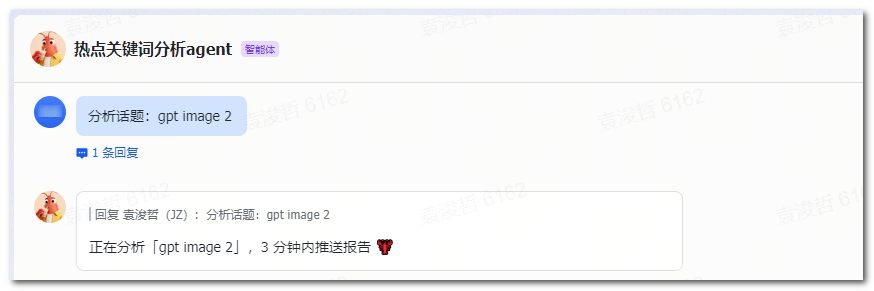
发送给龙虾后,龙虾会触发n8n流程
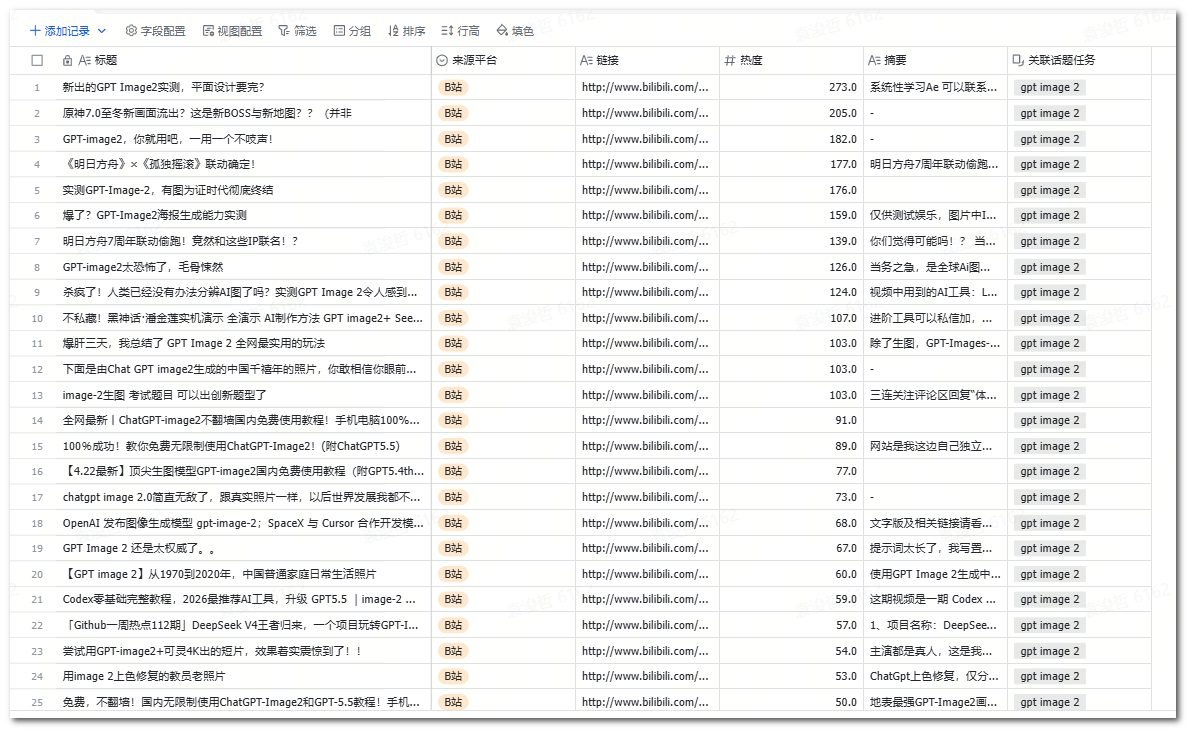
然后我们新建的多维表格里就会新增数据
①表A,话题任务表,记录我们新建的GPT image-2这个关键词洞察任务

②表B,话题原始数据表,记录B站里7天内相关关键词的内容和热度
五、最后
主动 + 被动,选题情报系统就完整了。
- 之前我们写的都是主动定时的场景——每天/每周自动从 YouTube、Reddit、B 站、对标频道拉取数据,沉淀到表里。
- 这一篇是被动触发——看到外面有什么热点,飞书一句话「分析话题:xxx」,立刻拿到要不要跟、怎么切。
两者数据都进同一个 base,过一段时间回头看,能复盘哪些热点跟过、哪些角度选得对、哪些跟错了。
我们先单源跑通,再考虑加源。
比如这一版只用 B 站,目的就是把链路彻底跑通。等用顺了,再按同一套结构往里加 Reddit、知乎、微博热搜、即刻等渠道——只需要在节点 6 里多加一段抓取逻辑,下游完全不用改。
六、附完整工作流
把下面这段 JSON 复制保存为 topic-radar.json,然后在 n8n 里 → Workflows → Import from File 选这个文件即可。
导入后还需要做两件事:
1.打开 Init 节点,把 tikhub.apiKey / feishu.appId / feishu.appSecret / bitableAppToken / topicTaskTableId / rawDataTableId / receiverOpenId / deepseek.apiKey 全部填上你自己的值;
2.激活 Workflow,复制 Webhook 节点上的 Production URL,粘到龙虾的指令里。
{
  "name": "Topic Radar - 话题热点速读机(B 站版)",
  "nodes": [
    {
      "parameters": {
        "httpMethod": "POST",
        "path": "topic-radar",
        "responseMode": "onReceived",
        "options": {}
      },
      "id": "1",
      "name": "Webhook",
      "type": "n8n-nodes-base.webhook",
      "typeVersion": 1.1,
      "position": [240, 300],
      "webhookId": "topic-radar"
    },
    {
      "parameters": {
        "mode": "runOnceForAllItems",
        "jsCode": "const webhookBody = $input.first().json.body || $input.first().json;\nconst topic = (webhookBody.topic || webhookBody.query?.topic || 'unknown').trim();\n\nconst config = {\n  timezone: 'Asia/Shanghai',\n  tikhub: { baseUrl: 'https://api.tikhub.io', apiKey: '' },\n  feishu: {\n    appId: '',\n    appSecret: '',\n    bitableAppToken: '',\n    topicTaskTableId: '',\n    rawDataTableId: '',\n    receiverOpenId: ''\n  },\n  deepseek: { baseUrl: 'https://api.deepseek.com', apiKey: '', model: 'deepseek-chat' },\n  positioning: '我的账号定位:飞书多维表格 + n8n 自动化工作流 + AI 工具落地方案;面向中小企业 IT/运营、有动手能力的创作者;差异化主张是用工具组合搭轻量业务系统,不写代码也能搞定;不教单工具,教工具组合解决具体业务问题。',\n  maxItems: 30\n};\n\nconst nowSec = Math.floor(Date.now() / 1000);\nconst beginSec = nowSec - 7 * 24 * 60 * 60;\n\nreturn [{ json: { topic, config, range: { pubtime_begin_s: beginSec, pubtime_end_s: nowSec }, triggerTime: new Date().toISOString() } }];"
      },
      "id": "2",
      "name": "Init",
      "type": "n8n-nodes-base.code",
      "typeVersion": 2,
      "position": [460, 300]
    },
    {
      "parameters": {
        "method": "POST",
        "url": "https://open.feishu.cn/open-apis/auth/v3/tenant_access_token/internal/",
        "sendHeaders": true,
        "headerParameters": {
          "parameters": [
            { "name": "Content-Type", "value": "application/json; charset=utf-8" }
          ]
        },
        "sendBody": true,
        "specifyBody": "json",
        "jsonBody": "={{ JSON.stringify({ app_id: $json.config.feishu.appId, app_secret: $json.config.feishu.appSecret }) }}",
        "options": {}
      },
      "id": "3",
      "name": "Feishu - tenant_access_token",
      "type": "n8n-nodes-base.httpRequest",
      "typeVersion": 4.2,
      "position": [680, 300]
    },
    {
      "parameters": {
        "mode": "runOnceForAllItems",
        "jsCode": "const token = $json.tenant_access_token;\nconst init = $('Init').first().json;\n\nif (!init?.config?.tikhub?.apiKey) {\n  throw new Error('请在 Init 节点填写 config.tikhub.apiKey');\n}\nif (!token) {\n  throw new Error('飞书 tenant_access_token 为空,检查 appId/appSecret');\n}\n\nreturn [{ json: { ...init, tenant_access_token: token } }];"
      },
      "id": "4",
      "name": "Pack",
      "type": "n8n-nodes-base.code",
      "typeVersion": 2,
      "position": [900, 300]
    },
    {
      "parameters": {
        "method": "POST",
        "url": "=https://open.feishu.cn/open-apis/bitable/v1/apps/{{$json.config.feishu.bitableAppToken}}/tables/{{$json.config.feishu.topicTaskTableId}}/records",
        "sendHeaders": true,
        "headerParameters": {
          "parameters": [
            { "name": "Authorization", "value": "=Bearer {{$json.tenant_access_token}}" },
            { "name": "Content-Type", "value": "application/json; charset=utf-8" }
          ]
        },
        "sendBody": true,
        "specifyBody": "json",
        "jsonBody": "={{ JSON.stringify({ fields: { \"话题名称\": $json.topic, \"触发时间\": new Date().getTime(), \"是否立项\": \"待定\" } }) }}",
        "options": {}
      },
      "id": "5",
      "name": "Create Topic Task",
      "type": "n8n-nodes-base.httpRequest",
      "typeVersion": 4.2,
      "position": [1120, 300]
    },
    {
      "parameters": {
        "mode": "runOnceForAllItems",
        "jsCode": "function stripHtml(s) { return String(s || '').replace(/<[^>]+>/g, ''); }\nfunction buildQuery(params) { const parts = []; for (const key in params) { if (!Object.prototype.hasOwnProperty.call(params, key)) continue; const value = params[key]; if (value === undefined || value === null || value === '') continue; parts.push(encodeURIComponent(key) + '=' + encodeURIComponent(String(value))); } return parts.join('&'); }\n\nconst input = $('Pack').first().json;\nconst cfg = input.config;\nconst range = input.range;\nconst token = input.tenant_access_token;\nconst topic = input.topic;\nconst apiKey = cfg.tikhub.apiKey;\nconst base = (cfg.tikhub.baseUrl || 'https://api.tikhub.io').replace(/\\/$/, '');\nconst headers = { Authorization: `Bearer ${apiKey}` };\nconst maxItems = Number(cfg.maxItems) || 30;\n\nconst qs = buildQuery({ keyword: topic, order: 'click', page: '1', page_size: '30', duration: '0', pubtime_begin_s: String(range.pubtime_begin_s), pubtime_end_s: String(range.pubtime_end_s) });\nconst url = `${base}/api/v1/bilibili/web/fetch_general_search?${qs}`;\n\nconst resp = await this.helpers.httpRequest({ method: 'GET', url, headers, json: true, timeout: 120000 });\nconst list = resp?.data?.data?.result || [];\n\nconst allItems = [];\nfor (const it of list) {\n  if (!it || it.type !== 'video' || !it.bvid) continue;\n  allItems.push({\n    source: 'B站',\n    title: stripHtml(it.title || ''),\n    summary: String(it.description || '').slice(0, 300),\n    link: it.arcurl || `https://www.bilibili.com/video/${it.bvid}`,\n    heat: Number(it.play) || 0,\n    published: typeof it.pubdate === 'number' ? new Date(it.pubdate * 1000).toISOString() : ''\n  });\n  if (allItems.length >= maxItems) break;\n}\n\nconst heats = allItems.map(it => it.heat || 0);\nconst sum = heats.reduce((a, b) => a + b, 0);\nconst avg = heats.length > 0 && sum > 0 ? sum / heats.length : 1;\n\nconst taskRecordId = $('Create Topic Task').first().json.data.record.record_id;\nconst records = allItems.map(it => ({ fields: { \"标题\": it.title.slice(0, 200), \"来源平台\": it.source, \"链接\": it.link, \"热度\": Math.round((it.heat / avg) * 100), \"摘要\": it.summary, \"关联话题任务\": [taskRecordId] } }));\n\nreturn [{ json: { topic, config: cfg, tenant_access_token: token, taskRecordId, items: allItems, records, stats: { total: allItems.length }, triggerTime: input.triggerTime } }];"
      },
      "id": "6",
      "name": "TikHub Search B站",
      "type": "n8n-nodes-base.code",
      "typeVersion": 2,
      "position": [1340, 300]
    },
    {
      "parameters": {
        "conditions": {
          "options": { "caseSensitive": true, "leftValue": "", "typeValidation": "strict" },
          "conditions": [
            {
              "id": "cond1",
              "leftValue": "={{ $json.stats.total }}",
              "rightValue": 0,
              "operator": { "type": "number", "operation": "gt" }
            }
          ],
          "combinator": "and"
        },
        "options": {}
      },
      "id": "7",
      "name": "IF records > 0",
      "type": "n8n-nodes-base.if",
      "typeVersion": 2,
      "position": [1560, 300]
    },
    {
      "parameters": {
        "method": "POST",
        "url": "=https://open.feishu.cn/open-apis/bitable/v1/apps/{{$json.config.feishu.bitableAppToken}}/tables/{{$json.config.feishu.rawDataTableId}}/records/batch_create",
        "sendHeaders": true,
        "headerParameters": {
          "parameters": [
            { "name": "Authorization", "value": "=Bearer {{$json.tenant_access_token}}" },
            { "name": "Content-Type", "value": "application/json; charset=utf-8" }
          ]
        },
        "sendBody": true,
        "specifyBody": "json",
        "jsonBody": "={{ JSON.stringify({ records: $json.records }) }}",
        "options": {},
        "continueOnFail": true
      },
      "id": "8",
      "name": "Feishu - batch_create",
      "type": "n8n-nodes-base.httpRequest",
      "typeVersion": 4.2,
      "position": [1780, 220]
    },
    {
      "parameters": {
        "mode": "runOnceForAllItems",
        "jsCode": "const prev = $('TikHub Search B站').first().json;\nconst cfg = prev.config;\nconst topic = prev.topic;\nconst items = prev.items || [];\nconst positioning = cfg.positioning;\n\nconst list = items.map((it, i) => `${i + 1}. [${it.source}|热度${it.heat}] ${it.title.replace(/\"/g, \"'\")} | ${it.summary.replace(/\"/g, \"'\").slice(0, 120)} | ${it.link}`).join('\\n');\n\nconst prompt = `你是一名资深的中文自媒体内容运营顾问。请基于下面的\"账号定位\"和\"抓取的近 7 天 B 站高播放视频列表\",用中文完成一份\"话题速读报告\",纯自然段落输出,不要 JSON 不要代码块,不要使用英文双引号,可以用中文引号或单引号。\\n\\n【账号定位】\\n${positioning}\\n\\n【话题关键词】\\n${topic}\\n\\n【抓取的内容列表(B 站近 7 天,共 ${items.length} 条)】\\n${list}\\n\\n【请按以下结构输出】\\n\\n一、话题热度判断\\n- 大盘热度(高/中/低),简短理由\\n\\n二、角度分布与红蓝海识别\\n- 把视频按主要内容角度聚类成 5 到 7 类,估算每类占比\\n- 标注每类是红海(占比 25% 以上)/ 中度 / 蓝海(占比 10% 以下且符合账号定位)\\n\\n三、不建议跟的方向\\n- 列出 1 到 2 个红海方向,简短说明为什么不适合该账号\\n\\n四、给该账号的 3 条差异化写作建议\\n对每条建议,给出:\\n1) 角度名称\\n2) 推荐理由(为什么贴合上面账号定位的'工具组合 + 业务系统 + 不写代码'主张)\\n3) 标题草案(16 到 25 字,含具体工具名)\\n4) 大纲方向(3 到 5 个要点)\\n5) 蓝海评级(一星到三星)\\n\\n五、风险提示\\n- 时效性提示\\n- 账号匹配度提示\\n\\n整体语气保持冷静、专业、数据驱动,避免营销腔。`;\n\nreturn [{ json: { ...prev, deepseek_input: prompt } }];"
      },
      "id": "9",
      "name": "Build DeepSeek Prompt",
      "type": "n8n-nodes-base.code",
      "typeVersion": 2,
      "position": [2000, 220]
    },
    {
      "parameters": {
        "method": "POST",
        "url": "={{ $json.config.deepseek.baseUrl.replace(/\\/$/, '') + '/v1/chat/completions' }}",
        "sendHeaders": true,
        "headerParameters": {
          "parameters": [
            { "name": "Content-Type", "value": "application/json" },
            { "name": "Authorization", "value": "=Bearer {{$json.config.deepseek.apiKey}}" }
          ]
        },
        "sendBody": true,
        "specifyBody": "json",
        "jsonBody": "={{ JSON.stringify({ model: $json.config.deepseek.model, messages: [{ role: 'user', content: $json.deepseek_input }] }) }}",
        "options": { "timeout": 120000 }
      },
      "id": "10",
      "name": "DeepSeek 洞察",
      "type": "n8n-nodes-base.httpRequest",
      "typeVersion": 4.2,
      "position": [2220, 220]
    },
    {
      "parameters": {
        "method": "PUT",
        "url": "=https://open.feishu.cn/open-apis/bitable/v1/apps/{{$('Build DeepSeek Prompt').first().json.config.feishu.bitableAppToken}}/tables/{{$('Build DeepSeek Prompt').first().json.config.feishu.topicTaskTableId}}/records/{{$('Build DeepSeek Prompt').first().json.taskRecordId}}",
        "sendHeaders": true,
        "headerParameters": {
          "parameters": [
            { "name": "Authorization", "value": "=Bearer {{$('Build DeepSeek Prompt').first().json.tenant_access_token}}" },
            { "name": "Content-Type", "value": "application/json; charset=utf-8" }
          ]
        },
        "sendBody": true,
        "specifyBody": "json",
        "jsonBody": "={{ JSON.stringify({ fields: { \"数据条数\": $('Build DeepSeek Prompt').first().json.stats.total, \"AI洞察报告\": ($json.choices && $json.choices[0] && $json.choices[0].message && $json.choices[0].message.content) || '' } }) }}",
        "options": {}
      },
      "id": "11",
      "name": "Update Topic Task",
      "type": "n8n-nodes-base.httpRequest",
      "typeVersion": 4.2,
      "position": [2440, 220]
    },
    {
      "parameters": {
        "method": "POST",
        "url": "https://open.feishu.cn/open-apis/im/v1/messages?receive_id_type=open_id",
        "sendHeaders": true,
        "headerParameters": {
          "parameters": [
            { "name": "Authorization", "value": "=Bearer {{$('Build DeepSeek Prompt').first().json.tenant_access_token}}" },
            { "name": "Content-Type", "value": "application/json; charset=utf-8" }
          ]
        },
        "sendBody": true,
        "specifyBody": "json",
        "jsonBody": "={{ JSON.stringify({ receive_id: $('Build DeepSeek Prompt').first().json.config.feishu.receiverOpenId, msg_type: 'text', content: JSON.stringify({ text: '🔥 话题速读:' + $('Build DeepSeek Prompt').first().json.topic + '\\n\\n' + (($json.choices && $json.choices[0] && $json.choices[0].message && $json.choices[0].message.content) || '分析失败') + '\\n\\n详情见多维表格。' }) }) }}",
        "options": {}
      },
      "id": "12",
      "name": "Send Lark Message",
      "type": "n8n-nodes-base.httpRequest",
      "typeVersion": 4.2,
      "position": [2660, 220]
    }
  ],
  "connections": {
    "Webhook": { "main": [[{ "node": "Init", "type": "main", "index": 0 }]] },
    "Init": { "main": [[{ "node": "Feishu - tenant_access_token", "type": "main", "index": 0 }]] },
    "Feishu - tenant_access_token": { "main": [[{ "node": "Pack", "type": "main", "index": 0 }]] },
    "Pack": { "main": [[{ "node": "Create Topic Task", "type": "main", "index": 0 }]] },
    "Create Topic Task": { "main": [[{ "node": "TikHub Search B站", "type": "main", "index": 0 }]] },
    "TikHub Search B站": { "main": [[{ "node": "IF records > 0", "type": "main", "index": 0 }]] },
    "IF records > 0": {
      "main": [
        [{ "node": "Feishu - batch_create", "type": "main", "index": 0 }],
        [{ "node": "Build DeepSeek Prompt", "type": "main", "index": 0 }]
      ]
    },
    "Feishu - batch_create": { "main": [[{ "node": "Build DeepSeek Prompt", "type": "main", "index": 0 }]] },
    "Build DeepSeek Prompt": { "main": [[{ "node": "DeepSeek 洞察", "type": "main", "index": 0 }]] },
    "DeepSeek 洞察": { "main": [[{ "node": "Update Topic Task", "type": "main", "index": 0 }]] },
    "Update Topic Task": { "main": [[{ "node": "Send Lark Message", "type": "main", "index": 0 }]] }
  },
  "settings": { "executionOrder": "v1" }
}
📋 这套话题速读相关模板,我整理成模板了
跟着上面步骤搭要花点时间。想直接拿现成的改,加我微信备注「博客 话题速读」,我发你。
🤔 卡在某一步了?
搭建过程里如果哪一步卡住了,如果你照着做没跑通,或者你们公司情况不太一样,可以找我聊聊,我免费帮你看看怎么调。不合适我也会直说。

扫码加我,备注「博客 话题速读」领模板
想看更多这类方案,我都整理在 吨师傅工具箱 里了:客户管理、进销存、工单报修……按场景分好类,可以直接抄。